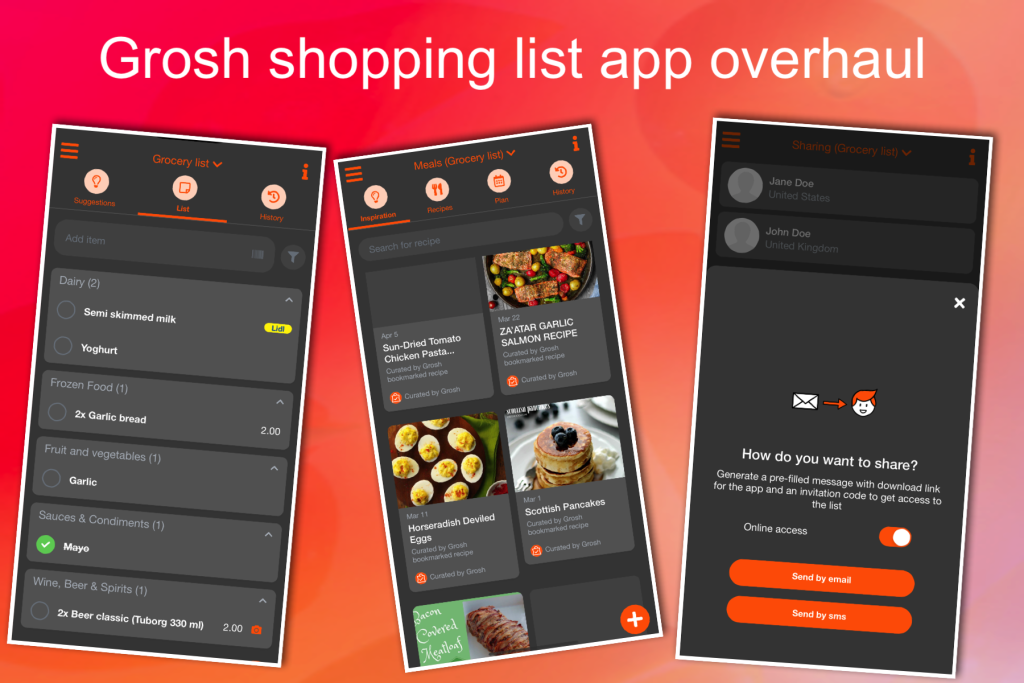
The last months, the Grosh team has been busy working on a user interface overhaul. We’re happy to launch the new look today with Grosh version 5, and along with it we also make it possible to send your shopping list directly to a webshop, starting with Amazon.
UI Overhaul
You will right away notice a more “modern” look based in the app. We’ve followed these design principles in our overhaul:
- Simplified, flat look on all lists
- Stricter colour use, reserve our branding colour for important visual indications
- Edit fields have small font label at the top to make it clear what they contain after being filled in
- Context menu button to top right (replacing info button, info text now at bottom of screen)
- Get rid of half empty subscreens, instead use slide up “half screens”
- Get rid of modal notifications, instead inline messages at bottom of pages
- Edit fields use slide up screen for editing with an option to abort editing
- No implicit save, use save buttons to give users more control
- Right swipe action being phased out with tappable toggle button
- Swipe texts replaced with icons
- Nicer looking Gradient colours info guides
Try out the app to appreciate the changes.
Link item to a webshop product
To add a link to an item on your shopping list to a webshop product, press the search icon next to the item name on the item details form. This brings up a page listing the matches found at the webshop defined by default for your shopping list – which is currently Amazon.
You can define the default webshop search URL under list settings, or choose between a few predefined favourite stores (selected countries only).
On the webshop, navigate to the right product, then tap “Store link” at the bottom of the page to save the exact link into Grosh. The link is stored in the item notes, and the store is automatically set for the item as well.
Submit to webshop
In order to submit your list to Amazon, the items must be linked to an Amazon product and store set to Amazon (happens automatically when linking using the search function). Once you have that, a Checkout button appears at the bottom of the current list page. Tap that to transfer the items to your Amazon basket and complete the checkout at Amazon.
Expose your webshop in Grosh
If you’ve got a webshop or app that supports basket transfer and would like to get it integrated with Grosh, please reach out to us.
Various minor features and fixes
- Select favourite lists: You can now mark which lists should appear at the top of the select list screen. Tap the pen icon to the right of the list name to toggle on the favourite status. Until you’ve toggled at least one, the favourite status is auto-calculated based on list activity.
- Apple Watch section can now be tapped to show context menu (if you want to avoid using force touch)
- Simpler fill in of store search using “favourite” button
- Various minor bug fixes
Kind regards
The Grosh Team
PS As always, if you have any problems or have questions about Grosh, you can always send a message straight from the app under Menu-Information-Other or send an email to support at groshapp.com