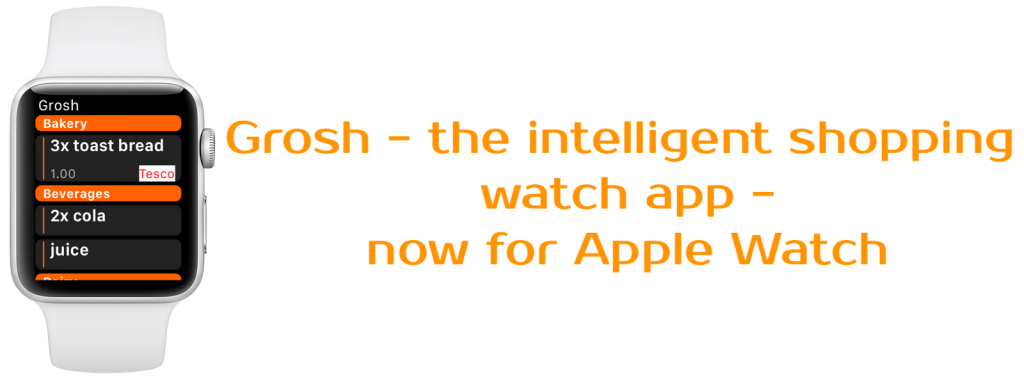
Know how it can be hard to put big groceries in the cart while holding your smartphone? Or how you wish you could quickly add something to your shopping list without the phone? Not a problem anymore, read all about Grosh for Apple Watch.
Refined from our popular Pebble version
We’re not really trying to invent a great watch app from scratch here. Our new Apple Watch version can be seen as an evolution of the Pebble smart watch version that was launched back in 2016, and it actually has the same feature set, namely:
- Shopping groceries
- Read shopping list in store
- Marking items as bought
- Adding items to shopping list
- Via dictation
- Via frequently bought item list
The watch app is only aimed at these scenarios, use the normal Grosh app for e.g. planning your shopping or sharing the list with someone.
Out of beta testing
We’ve been busy beta testing Grosh for Apple Watch since November. Our users have found a few minor issues, but the overall report is that the app works great 🙂
Only for Premium users
Grosh for Apple Watch is available only for Premium subscribers. Grosh development and server bills need to be paid, so we urge all regular users to consider our Premium subscription. In order to encourage the Premium upgrade, major new features such as the Apple Watch support are exclusively available to our Premium subscribers.
Works like the phone app
When you launch Grosh on your Apple Watch the last shopping list used will be displayed, like on the phone app. If you’re in a store, the list is sorted according to the layout, also just like the phone app. The store name will appear in the title, when the store has been detected and the list is sorted according to it. Currently, it takes about 10 sec for the app to detect this, we’re looking into how to make this faster in an upcoming release. If you’re at a location with much shopping activity, but the store is not known by Grosh, you may set it using the force touch menu. Do so to ensure the list is sorted correctly and that the shopping trip is tagged with the correct store.
Grocery details display
Tap to open details for an item. You can modify quantity (set to 0 to delete item) or mark item as purchased. The rest of the information is read-only, so you cannot modify grocery name, price or store. Please use the phone app for editing shopping list details.
Dictating items
Use force touch to open a context menu with access to refresh, change list or add an item. You may add items either via dictation or by tapping a frequently used grocery. The list of frequently bought items is adapted as you use either the normal Grosh app or Grosh for Apple Watch 🙂
Offline mode
You can use Grosh for Apple Watch even though the phone has no 3/4G connection. When you’re online again, just refresh the list from the context menu on the watch to resync the list.
We hope you like Grosh for Apple Watch. However, if you don’t have a Pebble or Apple smart watch, you might be asking when we’re going to support your device. The short answer is that we don’t know. We have no clear next candidate yet – but keep those suggestions coming in. We will be choosing the next smart watch model based on what our users tell us to support 🙂
Kind regards
The Grosh Team